Showing posts with label Facebook advertising. Show all posts

Tuesday, 9 September 2014

After 1.5 Million Posts Analyzed, Here is the Perfect Facebook Post!

The Perfect Facebook Post
Do you know how to craft the perfect Facebook post?
Being on the Facebook News Feed has become as hard as being on Google’s first page.
The fierce competition and recent changes in the algorithm are turning this almost impossible, and what makes the difference often times comes down to small details, testing and optimizing every single aspect of your content.
TrackMaven analyzed more than 1.5 million pieces of content on 6,000 Pages, here is what they said…
“We found that when the various elements of a Facebook post are strategically crafted, the viral reach of posts is extended in the News Feed.” 
Now, let’s take a look at these different items TrackMaven is calling the nuts and bolts of the perfect Facebook post:

Word Count

I know you’ve probably heard that short posts get better performance. It’s a myth. I’ve seen many people use Facebook pages pretty much as if they were blogs, Mari Smith is very successful writing long posts (John Haydon points it out in this post).
This study backs it up with data, posts with 80-89 words get double the engagement (6.19%) that those with 70-79 words (3.42%).
Facebook posts with 80-89 words get double the engagement (6.19%) that those with 70-79 words...
CLICK TO TWEET
Powered By CoSchedule
My advice, get your message across in a way that will accomplish the goal for that specific post, whether it takes 10 or 300 words. The point is not to be afraid of the word count.

Visual Content

We all know visual content gets more engagement. According to this analysis, posts with photos get an average of 2.35 interactions per post, while text-only posts get only 1.71.
Of course you have to consider that 88% of Facebook posts do have an image.

After Hours

Turns out posting after hours (5pm – 1am EST) can get you 11% more interactions than those published during working hours.
This makes sense even without looking at the data, people should be more likely to interact with content when 1) is not overwhelmed with daily activities, and 2) is receiving fewer promotional messages on the screen.

Weekends

Posts published on Sunday can get 25% more likes, comments and shares than those published on Wednesday, but only 18% of the total posts are published on weekends…
Which proves my previous point: Test posting at times when there is less competition in the News Feed.
Facebook: Posting on Sunday can get you 25% more Engagement than Wednesday, but only 18% of posts...
CLICK TO TWEET
Powered By CoSchedule

Hashtags

I recently shared my opinion about Facebook Hashtags on PostPlanner. I basically said that I don’t really see hashtags making a big impact.
TrackMaven says that posts with hashtags see an average of 60% more interactions. I’ll be paying closer attention to this in the following days.

Questions

Posts that ask a question get 23% more engagement. This is obvious, a question is a form of call-to-action.
To me, this doesn’t necessarily mean that the post has to be a question, but that if you’re writing about an specific topic and you’re sharing your point of view, you can close the post with a question to generate engagement.
Facebook Posts that ask a question get 23% more engagement
CLICK TO TWEET
Powered By CoSchedule

Infographic

The perfect Facebook post
To view the original article 

Saturday, 30 August 2014

No More Click Bait: Facebook Explains How to Share Links

Facebook announced changes to their ever-changing News Feed algorithm that will impact the way brand content is distributed.
AGAIN.
Of course, this will certainly impact some brands more than others. Some are likely to take a hit in traffic. Others could see an improvement in referrals.
What happens to you depends on whether you’ve been sharing links the way Facebook has long recommended and whether you choose to ignore these final warnings.
Facebook says no to click baiting and explains how to share links properly...
CLICK TO TWEET

Stop Click-Baiting, Stupid

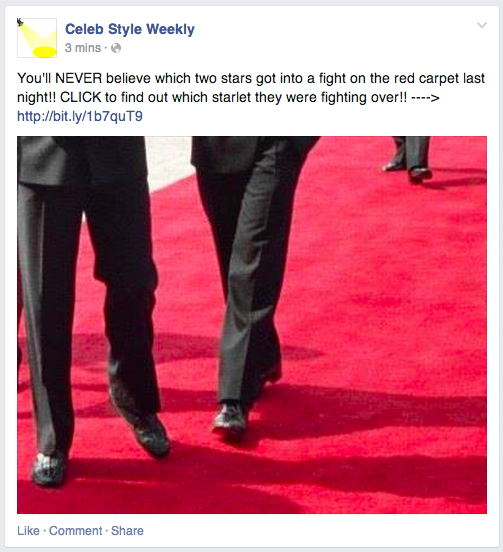
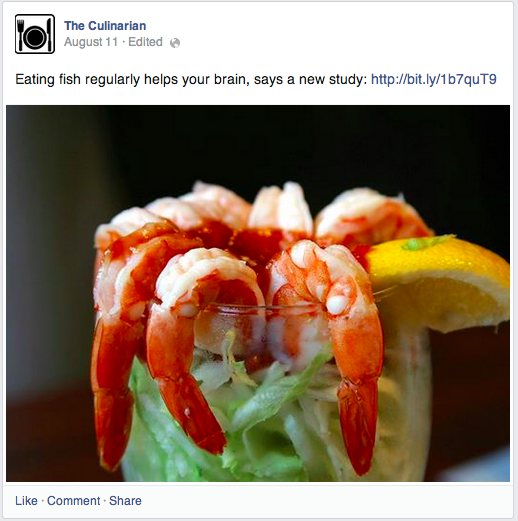
“Click bait” is when a link is shared with a title that entices the user to click without telling them what the article is actually about. Here’s an example…
click bait facebook No More Click Bait: Facebook Explains How to Share Links
This type of content has become extremely successful on Facebook lately since users can’t help but click to find out what the article is actually about. Titles often include phrases like “You won’t believe what happens next!” and “What this guy does is amazing!”
This type of content gamed Facebook’s News Feed algorithms. Since Facebook observes engagement signals to determine what content users will see, click-bait articles have been taking over the News Feed.
Of course, that doesn’t necessarily mean that people want to see this content. The purpose of click bait is to get a user to click the link, resulting in more people seeing that story and clicking it as well. But in reality, many users clicking were leaving unsatisfied.
And since these articles have been taking over the News Feed, they have been preventing users from seeing content they actually want to see. That, of course, is bad.
Facebook surveyed users and found that 80% preferred links with headlines that helped them understand what an article was actually about. As a result, Facebook is making a change.
Facebook says that over “the next few months,” distribution of this type of content will be negatively impacted. It’s not clear when this will begin or if it already has.

How Facebook Detects Click Bait

This is a question that is sure to arise. The truth is that it’s not in the words of your title but whether you deliver on your promise.
From Facebook’s announcement:
One way is to look at how long people spend reading an article away from Facebook. If people click on an article and spend time reading it, it suggests they clicked through to something valuable. If they click through to a link and then come straight back to Facebook, it suggests that they didn’t find something that they wanted. With this update we will start taking into account whether people tend to spend time away from Facebook after clicking a link, or whether they tend to come straight back to News Feed when we rank stories with links in them.
Another factor we will use to try and show fewer of these types of stories is to look at the ratio of people clicking on the content compared to people discussing and sharing it with their friends. If a lot of people click on the link, but relatively few people click Like, or comment on the story when they return to Facebook, this also suggests that people didn’t click through to something that was valuable to them.
So while the focus is on click bait, it’s really about directing users to content that they spend the time to read and then come back to Facebook to share it with their friends. These would be signals to Facebook that you are sharing valuable content and it should be shown to more people.
On the flip side, if Facebook sees that an article with a high number of clicks is resulting in low time away and few shares with their friends, you can expect such an article will get less distribution in the future.

Share Links the Way PEOPLE Do

Click bait is one example of brands attempting to take advantage of an algorithm to improve performance of their content, even if it lacks value. Another is the way they’ve been sharing links.
For a few years now, brands have taken note of the fact that photos and text updates tend to get more reach and/or engagement than a standard link share (pasting in the URL and allowing Facebook to pull in a thumbnail, title and description). As a result, they saw an opportunity.
You’ve undoubtedly seen brands share boring text updates with a link in it, but no link preview. This was done in an effort to reach more people because their results showed that Reach was higher with text updates than link shares.
Brands will also share a large image and attach a link within the description like this:
facebook photo link No More Click Bait: Facebook Explains How to Share Links
The theory was that photo posts received more engagement, so they “performed” better than a standard link share. So brands shared links in this way to get that additional reach and engagement.
Of course, most brands sharing in this manner were neglecting an important metric: Website clicks. Were they actually driving more website traffic in this way?
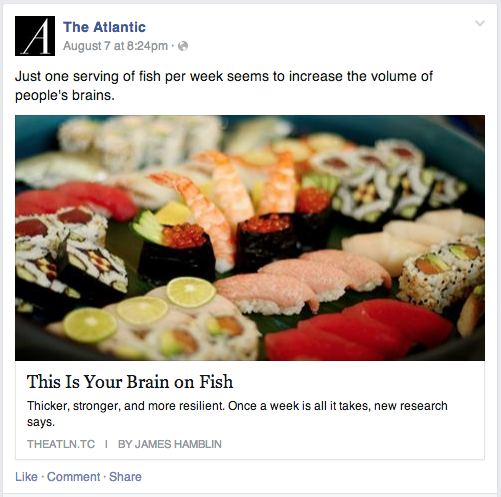
According to Facebook’s research, they weren’t. In fact, links shared with a preview like the one below were getting double the clicks…
facebook link share No More Click Bait: Facebook Explains How to Share Links
The confusion centers around the word “clicks.” Brands think they are getting better success from the photo share because it gives them more photo clicks, but rarely will it provide more link clicks.
As a result, Facebook will begin favoring links shared with a standard preview as opposed to with an attached photo.
Bottom line: Users don’t share links in this way. The reason brands are doing it is due to a perceived weakness in the algorithm.
I encourage marketers to give their methods some additional thought. Facebook is a social network. Users are kings. You should think twice about sharing in ways that are unnatural to the user.

How This Impacts You

Marketers tend to overreact whenever such news is announced. Let’s not get crazy here.
If you previously only shared links with a photo, you should consider changing this. It doesn’t mean the old method won’t reach anyone, but you should take a very close look at your metrics to determine what is and isn’t working for you.
It doesn’t mean you should stop sharing photos. I have a photographer friend who benefits from that extra real estate within News Feed to share his photos. He swears he gets better results all around when he shares photos with links in them. He should continue to do so, but he should also split test it against the way Facebook intends.
I have little sympathy for those who use click bait. Yes, it “works.” But as a user, it’s freaking deceiving and annoying. I’ve grown tired of seeing these titles in my News Feed and I’m glad Facebook is doing something about it.
End of the day, you need to provide value. You need to follow through on the promise you made with your share. And you need to make a user’s experience on Facebook better.
If you fail at that, you can expect that your content will be punished.
I’ve preached a very simple approach from Day 1: Share content that is helpful, educational or entertaining. Do not deceive. Do not prioritize posting method over the content. And do not chase an algorithm.
Those who follow these simple rules care very little about changes like the ones described above.

This Shouldn’t Be News

I’m actually a bit exhausted by this. I’ve been encouraging people to share links the way Facebook intended for years now. I wrote this post in February of 2013, begging you to stop using text updates and photos to share links.
Few listened.
Facebook wants to highlight the best content. They need users to have a good experience, see the content they want to see and spend more time on Facebook. Fewer users online and less time on site will lead to less advertising revenue.
Within the past year, Facebook has repeatedly rolled out algorithm updates that reward authenticity. They found that memes and asking for likes were throwing off the News Feed, so they made an adjustment in August of 2013.
They found that like-gating was resulting in people seeing content they didn’t necessarily want to see, so they ended that practice recently.
Maybe these changes anger you. Maybe they will be a wake-up call.
In reality, you should have expected it. Anything that results in an artificial inflation in distribution or doesn’t authentically reflect a user’s interests does not benefit user experience on Facebook.

Your Turn

What do you think of these changes? Are you impacted?
To view the original article Click Here

Wednesday, 20 August 2014

Facebook Ad Dayparting: Schedule Specific Times and Days to Run

One question I’ve repeatedly received from advanced Facebook advertisers involves dayparting: They want the ability to choose which times of the day to advertise and eliminate undesirable times.
Such a request comes mainly from those familiar with Google AdWords, where the feature is available. The thought is that certain times of the day are more effective than others, and dayparting limits waste.
Such a feature was not available for Facebook advertisers. Until now!
Dayparting is now available to Facebook advertisers: Choose specific times of day...

Use Power Editor

First, know that this functionality is currently only available in Power Editor.
While the main ad create tool has closed the gap lately in terms of functionality and is more useful than it’s been before, this is yet another reminder of why you need to be using Power Editor.
This feature will undoubtedly be rolled out to the ad create tool eventually, but it’s not there now. And if you want to advertise like the cool kids, you need to use Power Editor.

Schedule on Ad Set Level

You’ll be able to select specific times of the day to run your ad from the ad set level. Remember that ad sets allow you to set budget and start/end dates for a group of ads.
When you are in an ad set an “Ad Scheduling” notification will appear to you…
facebook power editor ad scheduling Facebook Ad Dayparting: Schedule Specific Times and Days to Run

Ad Scheduling Tour

Facebook will take you on an initial tour…
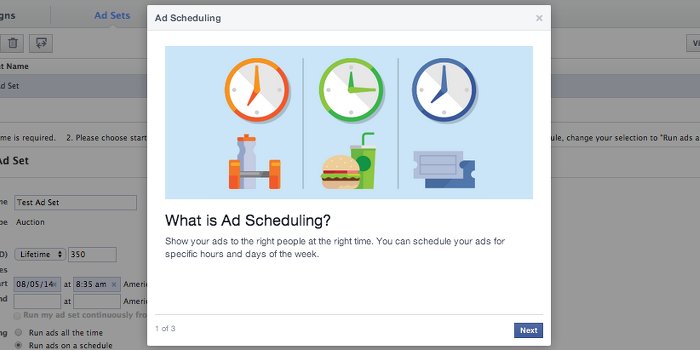
What is Ad Scheduling?
Show your ads to the right people at the right time. You can schedule your ads for specific hours and days of the week.
facebook ad scheduling 1 Facebook Ad Dayparting: Schedule Specific Times and Days to Run
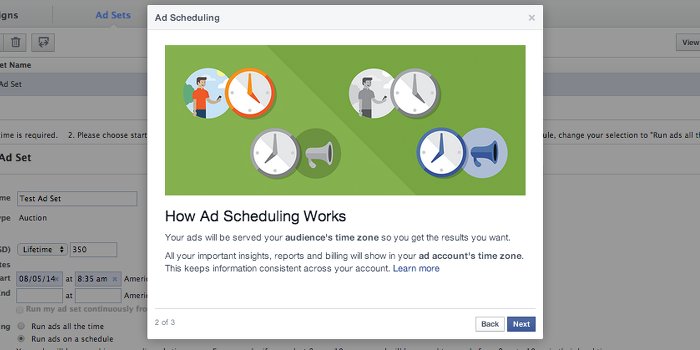
How Ad Scheduling Works
Your ads will be served your audience’s time zone so you get the results you want.
All your important insights, reports and billing will show in your ad account’s time zone. This keeps information consistent across your account.
facebook ad scheduling 2 Facebook Ad Dayparting: Schedule Specific Times and Days to Run
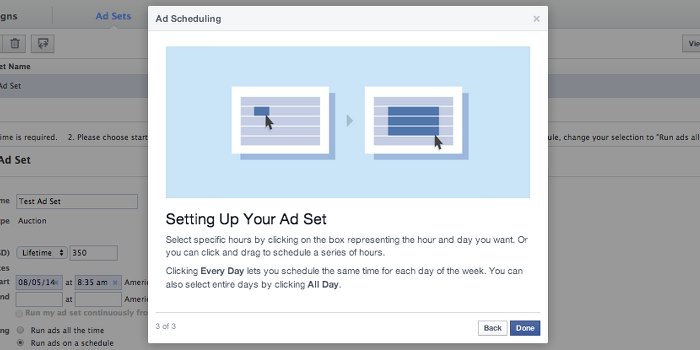
Setting Up Your Ad Set
Select specific hours by clicking on the box representing the hour and day you want. Or you can click and drag to select a series of hours.
Clicking Every Day lets you schedule the same time for each day of the week. You can also select entire days by clicking All Day.
facebook ad scheduling 3 Facebook Ad Dayparting: Schedule Specific Times and Days to Run

Hands On

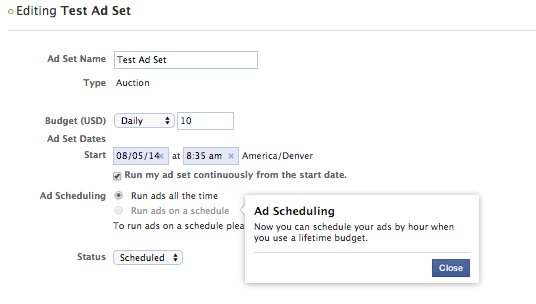
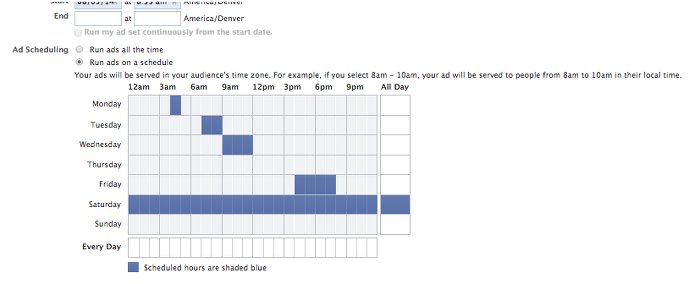
Note that you can only run this type of scheduling when you select “Lifetime” as your budgeting option. I don’t personally use lifetime, so this will be an adjustment.
You’ll want to select the radio button for “Run ads on a schedule.” Then manually choose the specific times and days you want your ad(s) to run.
facebook ad scheduling power editor Facebook Ad Dayparting: Schedule Specific Times and Days to Run

Dayparting on Facebook: What You Should Know

I’ve always been skeptical of the feature. The reason is that I’ve felt that some advertisers have had the wrong motivation for using it.
For example, they’ll assume their audience is online between 10am and 6pm, so they’ll want to focus their ads during those times. But does it really matter when your audience is reached?
Well, that’s the question this will answer. It’s possible, for example, that certain audiences are more likely to read than interact at certain times. Or they may be more likely to buy during non-work hours.
But keep in mind that this will limit your audience. For example, let’s assume your ad was originally going to be shown to four groups of people during the course of a day, based on when they are online:
  1. Group 1: Midnight – 6am (25 people)
  2. Group 2: 6am – 12 Noon (25 people)
  3. Group 3: 12 Noon – 6pm (25 people)
  4. Group 4: 6pm – Midnight (25 people)
All four groups can be reached in this original way of scheduling on Facebook.
But now you decide that you only want to reach people between noon and 6pm because you’ve determined that this time is most effective.
The result? Instead of potentially reaching 100 people (25 in each group), you can now reach a max of 25. This will certainly impact distribution.
As it is, many advertisers are complaining about a decrease in impressions lately. This can partly be blamed on the larger (and fewer) sidebar units. It can also be blamed on increased competition.

Just be aware that scheduling in this manner may cut the distribution (or at least potential distribution) of your ads even more.

Wednesday, 13 August 2014

Is Facebook Killing Your Business Page?

Facebook Is Killing the Managed Business Page
If you own a small business page on Facebook, you need to be aware of changes that Facebook is making to how your content is shared amongst your followers.
Beginning a couple of months ago, some companies’ managed business pages began to see a noticeable fall-off in activity. Their posts were reaching a much smaller number of fans than usual. After several weeks of tracking this trend, several companies asked Facebook if this was something on their end or had Facebook changed its algorithm. Facebook did not answer clearly for quite some time.
The drop-off in organic reach per fan, the rate that content is seen by a follower as a natural part of their daily newsfeed, continued to drop for even more pages. Usually, around 16-20 percent was considered to be a large number. That meant that almost a fifth of all your followers saw the content you posted. This number has since dwindled down to 4-6 percent.
This phenomenon was met with outrage and frustration from everyone involved. Ever increasing calls for why this has been happening was finally met with a confirmation from Facebook that they had changed their algorithm and organic reach had dropped considerably for every page. Their suggested fix for this was to pay them to post ads more frequently. Understandably, this solution was not met with too much optimism.
The majority of small businesses and fan groups out there made accusations ranging from mild frustration to outrageous accusations of illegitimate business practices. The larger issue was that these groups have spent a lot of time accumulating the followers and likes that they have. Facebook made the guarantee that followers and likes would translate into long-term success on Facebook’s business page options. These businesses and groups became frustrated when it was said that all this work they did was now secondary.
There is a legitimate method to this madness. The algorithm that Facebook uses to determine which posts make it to the newsfeed was changed to value greater quality posts. Things like interest in the quality of the post, who posted the content, how recently it was posted and other factors were the focus of this new algorithm.
Brian Boland, Facebook
VP Ads Product Marketing and Atlas at Facebook. (Photo: Facebook for Business)

Facebook’s Defence: The Challenges of being the world’s largest Social Media platform

Facebook admitted that organic reach rates had dropped, but it was not because they are being vindictive or seek greater profits. The head of Facebook’s ad product marketing, Brian Boland, stepped forward to answer questions that Facebook had been receiving for some time.
This change was not a bid to increase profits. Boland assured business owners that Facebook has always had its customers and businesses at heart throughout the changes that they have made. The choice to decrease organic reach rates was motivated to allow more people to be exposed on the newsfeed rather than having it dominated by a handful of super-massive groups. The paid-ads option was also meant to appease groups that had the budget to increase this minimal ad space. The two messages seem contradictory, but at its core, Facebook was trying to give the little guy a chance at making it on a newsfeed.
Part of the decrease was natural, an argument that has sound roots. The number of likes made per day has grown by 50 percent in the past few years. This is an incredible amount of people and information being posted on boards. Decrease in organic reach to a given managed business page was the result of too much content on too small of a venue. There are only so many hours people spend on Facebook and the newsfeed is only large enough to hold so much. This was a crisis of supply and demand. To resolve it, Facebook decided to cut everyone’s average reach in a bid to bring less popular pages to light.
When Boland spoke, he mentioned Google as a peer company that had a similar problem. Bigger companies with larger followings were posting low-quality blogs and content that were overshadowing the high-quality content that smaller businesses and bloggers were posting because they had so many more likes. Google then updated its algorithm to favour websites that posted good content more often, rather than spam websites. Facebook has merely tried to create a similar algorithm to better promote smaller businesses and fan pages.
Many of Boland’s answers and messages point to one larger assumption businesses must be making towards Facebook: it is changing. Advertising on Facebook is now a far different experience than it was even a few years ago. Where once success was determined by likes and follows, it is now far more similar to advertising on Google.
If you want a successful business page on Facebook, you must have great content, the interest to draw Facebook’s attention and the cash to supplement a reliable ad campaign.

Adapting your managed business page to the new Facebook

Now that you know what has occurred and what it means for you, how can you start adapting to the situation? Luckily, the grand majority of changes you have to make are relatively small. What they will require is more work on your part and dedication to the platform.
Post more often with fresh content. Now that the newsfeed’s content is far more limited, you will need more content to increase your chances of being posted for your followers to see. This means posting more often at all times of the day. Posting once or twice a day will only work if those posts receive a massive amount of activity. If a healthy discussion keeps your post in the newsfeed for hours, great! However, this is likely not the case.
You will want three to four posts a day, at various times of day. How recent a post was made is a large factor for Facebook, so older posts have an increasingly low chance of being put up on the newsfeed. Having a quasi-fresh post at all times of the day will help.
Facebook Insights
(Photo: Facebook for Business)
Facebook’s Insights Feature lets you know when to post. Posting all the time is best, but you also want to make sure that all of your work pays off. This means finding out when your demographic is the most active. Under ‘posts,’ Facebook has an option for your managed business page called “Insights.” This option allows you to see the activity on your page, how large it was and when it occurred. Use this information to decide when to be active on your business page.
Link back to your regular business website and any other social media accounts you may have. This is great for Facebook’s algorithm, but also for Google’s algorithm. The more connected your pages are, the more likely it will be noticed by search algorithms in general. It also allows your Facebook followers to jump back and forth between their comfortable Facebook feed and your website.
How businesses interact with Facebook has irreparably changed. It is harder, as a small company, to break into fame through the Facebook newsfeed and the odds are stacked higher than ever against you. The best way to grow your managed business page is to use the new Facebook to your advantage and spread your message through every avenue possible.
To see the original article Click Here.