Showing posts with label advertising on Facebook. Show all posts

Tuesday, 9 September 2014

After 1.5 Million Posts Analyzed, Here is the Perfect Facebook Post!

The Perfect Facebook Post
Do you know how to craft the perfect Facebook post?
Being on the Facebook News Feed has become as hard as being on Google’s first page.
The fierce competition and recent changes in the algorithm are turning this almost impossible, and what makes the difference often times comes down to small details, testing and optimizing every single aspect of your content.
TrackMaven analyzed more than 1.5 million pieces of content on 6,000 Pages, here is what they said…
“We found that when the various elements of a Facebook post are strategically crafted, the viral reach of posts is extended in the News Feed.” 
Now, let’s take a look at these different items TrackMaven is calling the nuts and bolts of the perfect Facebook post:

Word Count

I know you’ve probably heard that short posts get better performance. It’s a myth. I’ve seen many people use Facebook pages pretty much as if they were blogs, Mari Smith is very successful writing long posts (John Haydon points it out in this post).
This study backs it up with data, posts with 80-89 words get double the engagement (6.19%) that those with 70-79 words (3.42%).
Facebook posts with 80-89 words get double the engagement (6.19%) that those with 70-79 words...
CLICK TO TWEET
Powered By CoSchedule
My advice, get your message across in a way that will accomplish the goal for that specific post, whether it takes 10 or 300 words. The point is not to be afraid of the word count.

Visual Content

We all know visual content gets more engagement. According to this analysis, posts with photos get an average of 2.35 interactions per post, while text-only posts get only 1.71.
Of course you have to consider that 88% of Facebook posts do have an image.

After Hours

Turns out posting after hours (5pm – 1am EST) can get you 11% more interactions than those published during working hours.
This makes sense even without looking at the data, people should be more likely to interact with content when 1) is not overwhelmed with daily activities, and 2) is receiving fewer promotional messages on the screen.

Weekends

Posts published on Sunday can get 25% more likes, comments and shares than those published on Wednesday, but only 18% of the total posts are published on weekends…
Which proves my previous point: Test posting at times when there is less competition in the News Feed.
Facebook: Posting on Sunday can get you 25% more Engagement than Wednesday, but only 18% of posts...
CLICK TO TWEET
Powered By CoSchedule

Hashtags

I recently shared my opinion about Facebook Hashtags on PostPlanner. I basically said that I don’t really see hashtags making a big impact.
TrackMaven says that posts with hashtags see an average of 60% more interactions. I’ll be paying closer attention to this in the following days.

Questions

Posts that ask a question get 23% more engagement. This is obvious, a question is a form of call-to-action.
To me, this doesn’t necessarily mean that the post has to be a question, but that if you’re writing about an specific topic and you’re sharing your point of view, you can close the post with a question to generate engagement.
Facebook Posts that ask a question get 23% more engagement
CLICK TO TWEET
Powered By CoSchedule

Infographic

The perfect Facebook post
To view the original article 

Monday, 8 September 2014

Discover How being human helped this Facebook Page Get 1.2 Million Likes on a single post [Case Study]

DISCOVER 2 Discover How being human helped this Facebook Page Get 1.2 Million Likes on a single post [Case Study]

What does it mean when businesses are asked to be more human?
Share funny jokes?
Tell people about their day?
Share their favourite TV shows?
Although the above might seem a little farfetched in actual fact those suggestions aren’t far of the truth.
To humanize your business you must be willing to showcase its personality. 
How can a business have a personality? Well the simple fact is people love to connect with other people they know, like and can trust. This concept also applies to your business. Your customers are going to be more willing to do business with you if you can demonstrate you are an organisation that can be trusted and one that is a pleasure to deal with.
I believe one of the best ways to learn is to look at those who have already accomplished what you are aiming to achieve. That is why in this post I will show you how “Humans Of New York” have used being human to successfully connect and engage with their audience of over 7.7 Million Fans.
Before we take a look at the different ways “Humans Of New York” showcase their personality it’s important to realise what the page stands for. According to Brandon who founded the project : “Humans of New York provides a worldwide audience with daily glimpses into the lives of strangers in New York City.”
How being human helps your business connect with its customers

1) Storytelling

Humans of New York have done a great job of providing a glimpse into the lives of strangers living in New York City.
How have they achieved this?
Rather than just posting an image Brandon who started the project understood that people connect on a deeper level when their passions and ideas are shared. To help convey this he not only took photographs of the people he wished to feature on his Facebook page but also asked them to share a story about themselves. It was this story telling that helped the page grow at a rapid rate.
By sharing the stories of the strangers, Facebook fans were able to find out more about the people behind the lense and what they stood for. As a result the posts began to experience a large amount of shares from people who felt they could relate to these stories and wanted to tell their friends. In turn helping to increase the page’s reach and visibility. Below is an example of how this story shared by a dog owner helped the page to receive over600,000 likes and nearly 50,000 shares on a single post.

ravi 1 Discover How being human helped this Facebook Page Get 1.2 Million Likes on a single post [Case Study]2) Building Trust

To help build trust with your audience you must remain consistent with your content ~ Click To Tweet
By sharing their stories on a daily basis Humans Of New York were able to increase their trust with their audience as they began to get use to the type of content that was being shared. As a result more and more fans began to comment on the posts as they began to relate to the stories and what others have been through.
Through posting consistent daily content sharing the stories of other New Yorkers this had now created a passionate Facebook community who loved to listen and engage with the stories and in some cases even help out.
Here is a great example of how the Facebook community reacted when this story was shared and how they showed their support. This also led the post to receive over 1.2Million Likes and over 48,000 comments!

ravi 2 Discover How being human helped this Facebook Page Get 1.2 Million Likes on a single post [Case Study]

3) Transparency

The more transparent your business can be the better the relationship with its customers. ~ Click To Tweet
One of the great ways Humans of New York have been transparent with their fans is to share the stories directly from the people featured on the page. What makes this unique?
The best part about the stories shared on the page are that Brandon talks to each individual to find out their story then shares the part he feels reflects them as an individual. All the quotes taken from individuals are kept exactly as they have phrased them. This not only allows the page to build up a reputation as one that is authentic but also helps its fans connect with the stories behind the images as they are a true reflection of the individual. Editing these stories or changing the quotes to suit the brand may not have had the same effect. This is also a great demonstration of how the page helps to build trust not only with the brand but also with the content that gets shared.
Here is a great interview with Brandon where he discusses how he creates the stories for his Facebook page.

4) Building relationships

By being more open and sharing those stories that matter the most to your audience you will begin to notice a better relationship developing with your fans. As your fans begin to relate and understand your content better your business will start to experience better engagement and also begin to develop more loyal and passionate fans.
Building relationships on Facebook is a marathon not a sprint so pace yourself. ~Click To Tweet
When building this relationship with your fans it’s important to note that this does take time and requires a consistent effort on your part.
The more you can offer your Facebook audience the more you will get in return. ~Click To Tweet
Humans of New York have done a great job of building this relationship with their community by posting consistent content and engaging in conversation with their fans. Not only do they share their posts on a daily basis but also comment and reply to fans along the way. Not only does this build the relationship with your fans but is also a great way to get feedback on the type of content you are sharing.
Here’s an example of how Brandon used the comments to share more about the person featured in the post and replied to fans.ravi 3 Discover How being human helped this Facebook Page Get 1.2 Million Likes on a single post [Case Study]

Key Takeaways

It’s actually very simple to help build a better relationship with your fans and to humanise your business let them discover the people behind the organisation. This means showcasing what your business has planned behind the scenes, future projects, events attended and even fun facts about the employees that work there. It’s also very important when looking to build trust with your audience that your business is open with its fans. This means that your business is honest about its practices and owns up to any problems or issues that they are facing. Avoiding this will result in negative feedback and loss of trust. Lastly be there to engage with your fans, this means joining in conversation, highlighting their ideas and input (user generated content) and even rewarding them through competitions or giveaways.
To view the original article Click Here

Monday, 1 September 2014

How to Grow Your Email List With Facebook: 7 Easy to Implement Strategies

I’m finally getting around to watching the recordings from Social Media Marketing World 2014 and these notes came from the presentation by Amy Porterfield.  
Amy started her presentation by acknowledging the issue with Facebook reach and said that it’s time for a Mindset Shift:  Facebook is an Investment.
Start to look at Facebook differently and become one of the few to make BIG strides and impact on Facebook.
“Business is 80% psychology and 20% mechanics.” ~Tony Robbins
If you can get the psychology down, the mechanics is easy
She also said something I agree with wholeheartedly:
Tweet: “The energy of your business is directly tied to your email list.” ~ @AmyPorterfield #SMMW14 via http://ctt.ec/5H3PN+
Your number one focus should be growing your e-mail list. Facebook is the place where you turn Fans into Leads.

Use Graphsearch to Find Targeted Pages

Use Graphsearch find out where your audience is spending time on Facebook -type in “ Pages liked by People who Like ___your Page___” (or another page)
Facebook Graphsearch

I also have a post here about Facebook Graphsearch:  3 Interesting Uses of Facebook Graphsearch
Engagement: How does Facebook determine engagement:
  • Likes
  • Comments
  • Shares
  • Clicks
These must happen consistently or you do not make it into the News Feed

How to Get Engagement on Facebook

She talked about Native vs. Non-native posts:
Native posts are non-intrusive and shows that “you are one of them”.  It keeps people on Facebook.
native Facebook post
Non-native-It’s ALL about ME and redirects people to somewhere else
Non native Facebook posts
Quotes and meaningful messages can help get Likes and Shares
quotes on facebook

The Facebook Lead Strategy

1: Create an irresistible giveaway
A free webinar is a great freebie that people will sign up for.  Make it packed full of great tips for your audience.
2: Create an optin 
She recommends Lead Pages leadpages.net
Sidenote:  I like Leadpages because it’s easy to use but if you can create an optin page on your own site, do that.
3:  Set up an “Unpublished” news feed ad
You can also just do a Promoted Post that appears on your Facebook Page if you aren’t comfortable working with the Power Editor.
The Unpublished Post:
-everything is clickable
-everything is customizable
-image is large enough to grab attention:  1200 x 627 pixels and only 20% text
-separate campaigns for fans and non-fans
Ad Placement: ONLY put your ads in the News Feed
Audience Targeting: in the Interests box put in all the results you got from your Graphsearch
Unpublisehd Post
Unpublished post details
 4: Deliver the giveaway and then use email marketing to seal the deal
At the end of the webinar spend about 10 minutes going over your $97 product to sell.
5: Email marketing
You must use e-mail marketing to help you sell.
What to expect:
1: From fan to lead $1-$5
2: From non-fan to lead $3-$8
3: From lead to customer $10-$30
4: Daily spend $50/ day-(even $10/ day is an option)
Great information from Amy Porterfield! Make sure you connect with her at www.AmyPorterfield.com
If you need more tips on how to use Facebook Ads take a look at all my Facebook Ad posts and my Facebook Ad services.
What are your thoughts – have you used this strategy on Facebook?  How has it worked for you?  Share your thoughts in the comments below!
To view the original article Click Here

Saturday, 30 August 2014

No More Click Bait: Facebook Explains How to Share Links

Facebook announced changes to their ever-changing News Feed algorithm that will impact the way brand content is distributed.
AGAIN.
Of course, this will certainly impact some brands more than others. Some are likely to take a hit in traffic. Others could see an improvement in referrals.
What happens to you depends on whether you’ve been sharing links the way Facebook has long recommended and whether you choose to ignore these final warnings.
Facebook says no to click baiting and explains how to share links properly...
CLICK TO TWEET

Stop Click-Baiting, Stupid

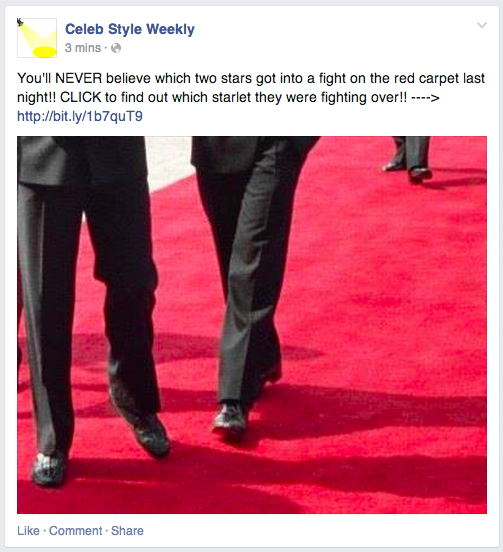
“Click bait” is when a link is shared with a title that entices the user to click without telling them what the article is actually about. Here’s an example…
click bait facebook No More Click Bait: Facebook Explains How to Share Links
This type of content has become extremely successful on Facebook lately since users can’t help but click to find out what the article is actually about. Titles often include phrases like “You won’t believe what happens next!” and “What this guy does is amazing!”
This type of content gamed Facebook’s News Feed algorithms. Since Facebook observes engagement signals to determine what content users will see, click-bait articles have been taking over the News Feed.
Of course, that doesn’t necessarily mean that people want to see this content. The purpose of click bait is to get a user to click the link, resulting in more people seeing that story and clicking it as well. But in reality, many users clicking were leaving unsatisfied.
And since these articles have been taking over the News Feed, they have been preventing users from seeing content they actually want to see. That, of course, is bad.
Facebook surveyed users and found that 80% preferred links with headlines that helped them understand what an article was actually about. As a result, Facebook is making a change.
Facebook says that over “the next few months,” distribution of this type of content will be negatively impacted. It’s not clear when this will begin or if it already has.

How Facebook Detects Click Bait

This is a question that is sure to arise. The truth is that it’s not in the words of your title but whether you deliver on your promise.
From Facebook’s announcement:
One way is to look at how long people spend reading an article away from Facebook. If people click on an article and spend time reading it, it suggests they clicked through to something valuable. If they click through to a link and then come straight back to Facebook, it suggests that they didn’t find something that they wanted. With this update we will start taking into account whether people tend to spend time away from Facebook after clicking a link, or whether they tend to come straight back to News Feed when we rank stories with links in them.
Another factor we will use to try and show fewer of these types of stories is to look at the ratio of people clicking on the content compared to people discussing and sharing it with their friends. If a lot of people click on the link, but relatively few people click Like, or comment on the story when they return to Facebook, this also suggests that people didn’t click through to something that was valuable to them.
So while the focus is on click bait, it’s really about directing users to content that they spend the time to read and then come back to Facebook to share it with their friends. These would be signals to Facebook that you are sharing valuable content and it should be shown to more people.
On the flip side, if Facebook sees that an article with a high number of clicks is resulting in low time away and few shares with their friends, you can expect such an article will get less distribution in the future.

Share Links the Way PEOPLE Do

Click bait is one example of brands attempting to take advantage of an algorithm to improve performance of their content, even if it lacks value. Another is the way they’ve been sharing links.
For a few years now, brands have taken note of the fact that photos and text updates tend to get more reach and/or engagement than a standard link share (pasting in the URL and allowing Facebook to pull in a thumbnail, title and description). As a result, they saw an opportunity.
You’ve undoubtedly seen brands share boring text updates with a link in it, but no link preview. This was done in an effort to reach more people because their results showed that Reach was higher with text updates than link shares.
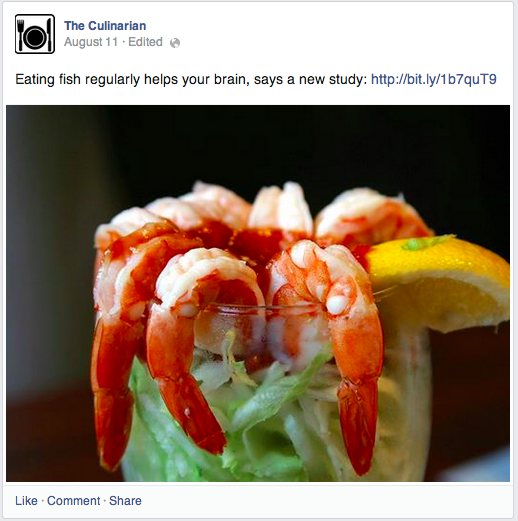
Brands will also share a large image and attach a link within the description like this:
facebook photo link No More Click Bait: Facebook Explains How to Share Links
The theory was that photo posts received more engagement, so they “performed” better than a standard link share. So brands shared links in this way to get that additional reach and engagement.
Of course, most brands sharing in this manner were neglecting an important metric: Website clicks. Were they actually driving more website traffic in this way?
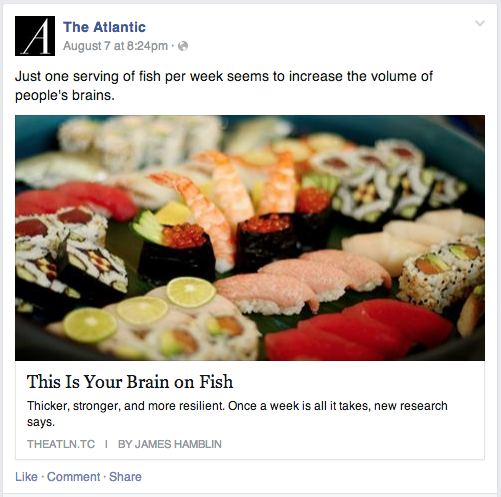
According to Facebook’s research, they weren’t. In fact, links shared with a preview like the one below were getting double the clicks…
facebook link share No More Click Bait: Facebook Explains How to Share Links
The confusion centers around the word “clicks.” Brands think they are getting better success from the photo share because it gives them more photo clicks, but rarely will it provide more link clicks.
As a result, Facebook will begin favoring links shared with a standard preview as opposed to with an attached photo.
Bottom line: Users don’t share links in this way. The reason brands are doing it is due to a perceived weakness in the algorithm.
I encourage marketers to give their methods some additional thought. Facebook is a social network. Users are kings. You should think twice about sharing in ways that are unnatural to the user.

How This Impacts You

Marketers tend to overreact whenever such news is announced. Let’s not get crazy here.
If you previously only shared links with a photo, you should consider changing this. It doesn’t mean the old method won’t reach anyone, but you should take a very close look at your metrics to determine what is and isn’t working for you.
It doesn’t mean you should stop sharing photos. I have a photographer friend who benefits from that extra real estate within News Feed to share his photos. He swears he gets better results all around when he shares photos with links in them. He should continue to do so, but he should also split test it against the way Facebook intends.
I have little sympathy for those who use click bait. Yes, it “works.” But as a user, it’s freaking deceiving and annoying. I’ve grown tired of seeing these titles in my News Feed and I’m glad Facebook is doing something about it.
End of the day, you need to provide value. You need to follow through on the promise you made with your share. And you need to make a user’s experience on Facebook better.
If you fail at that, you can expect that your content will be punished.
I’ve preached a very simple approach from Day 1: Share content that is helpful, educational or entertaining. Do not deceive. Do not prioritize posting method over the content. And do not chase an algorithm.
Those who follow these simple rules care very little about changes like the ones described above.

This Shouldn’t Be News

I’m actually a bit exhausted by this. I’ve been encouraging people to share links the way Facebook intended for years now. I wrote this post in February of 2013, begging you to stop using text updates and photos to share links.
Few listened.
Facebook wants to highlight the best content. They need users to have a good experience, see the content they want to see and spend more time on Facebook. Fewer users online and less time on site will lead to less advertising revenue.
Within the past year, Facebook has repeatedly rolled out algorithm updates that reward authenticity. They found that memes and asking for likes were throwing off the News Feed, so they made an adjustment in August of 2013.
They found that like-gating was resulting in people seeing content they didn’t necessarily want to see, so they ended that practice recently.
Maybe these changes anger you. Maybe they will be a wake-up call.
In reality, you should have expected it. Anything that results in an artificial inflation in distribution or doesn’t authentically reflect a user’s interests does not benefit user experience on Facebook.

Your Turn

What do you think of these changes? Are you impacted?
To view the original article Click Here

Friday, 29 August 2014

Why Dark Posts Are the Best Facebook Advertising Approach Right Now

Let me preface this post by highlighting the words in the title “right now.”
Facebook unpublished posts
photo credit: windy_sydney via photopin cc
As with all things in this fast changing digital world, a killer tactic today may soon be worth very little when, for example, the network you’re using it on decides to change the rules or it simply becomes diluted due to the fact that everyone is doing it now.
For today one of the most effective advertising plays on Facebook is something being called ”dark posts.” The term, while sounding a tad evil, actually applies to the tactic of using news feed style ads that do not actually get published to the newsfeed of your page.
Why use dark posts
So, you might ask – why would I use this tactic?
Imagine you sell four products and these products appeal to slightly different audiences and you’re not really sure of the most appealing call to action for each.
You want to advertise all of these products on Facebook and you’ve heard that news feed type sponsored posts are the best way to go. (It’s true for me, particularly on mobile devices where the ads look very much like the rest of the stream.)
Traditionally, the only way to advertise those four products in the news stream was to create four status update kinds of ads and then refine your targeting to get the add seen by the right audience.
But here’s the catch – all four of those ads just ran in your page’s stream and now that audience you’ve worked long and hard to build by sharing useful and engaging stuff is unliking as fast as they can. Your stream seems full of nothing but ads!
Oh, and like any smart marketer you need to A/B test several headline variations on each ad, further overwhelming your stream.
The dark post option to the rescue
Facebook has allowed advertisers to create news stream ads with the option of not publishing to them to the news feed for some time, but it’s still a fairly untapped play for the moment.
By employing this tactic the advertiser mentioned about could run all four product ads as sponsored posts, target different audiences, split test headlines and even create personalized messages for demographic and geographic targets – literally run dozens of ads all on the same day – without a single ad showing in their own news stream.
Are you starting to sense the power of the dark post?
How dark posts work
Dark posts are created using the somewhat clunky, very obtuse, Power Editor. I won’t go into a tutorial on obtaining and using the Power Editor as there are some fine ones here. If you have no idea what the Power Editor is you should read one of their tutorials before going much further.
If you are a Power Editor user you simply need to play around with a few more features.
The key to creating dark posts in the Power Editor lies in the editor’s ability to create posts. Until the dark post concept came along there really wasn’t much reason to use this feature as you could simply create posts as status updates.
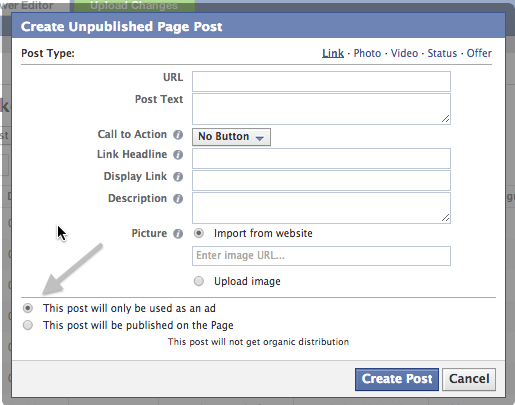
Fire up the Power Editor and start by clicking on Manage Pages and choose the page you would like to create the post for. Now hit Create Post but be sure to click the radio button that says – unpublished post.
Facebook Dark Posts
Now create your post by completing the fields. Remember, this is an ad, so pay close attention to headlines, call to action buttons, descriptions and images that grab. For some of the best advice on successful Facebook ad tactics head over to Jon Loomer’s awesome site.
Once you’ve created your post don’t forget the Power Editor requirement to upload the changes – the button at the top of the editor turns green when you’ve made a change and you have to hit that Upload Your Changes button before you can use this post.
If you are creating multiple posts you can create them all now and simply upload the entire batch. (You can view how your post will look on the desktop and in mobile and I suggest you take this step before uploading the batch)
Once all of your posts are created and uploaded you can switch to your Ad Manager and start creating ads by selecting the appropriate post to use as an ad, select your audience and choose your budget.
One bit of advice, don’t take the Facebook suggested budget. My experience is that you can start much lower and adjust accordingly. I don’t have hard data on this, but since I started refining better for multiple versions, I found my per click costs went down.
You can organize your ads by campaigns and ad groups, a feature that certainly makes sense when you start running lots of ads for different things.
Once your ads are approved you can start monitoring your Ad performance to tweak your tests and improve your results.
Now is the time to get on this tactic as my guess is that sometime in 2015 it will become less effective.
To read the original article Click Here